


Find out if your computer can run the so-called XP Mode
One of the reasons why users are so reluctant to change their operating system is due to the fear of not being able to use their old applications. This isn't a problem is you want to change to Windows 7 because Microsoft has included in this system the so-called "XP Mode".
To be able to know if your computer is capable of emulating Windows XP SP3 on Windows 7 you will need the Microsoft HAV Detection Tool, which is a utility designed to determine if your computer has the resources necessary.
Microsoft Hardware-Assisted Virtualization Detection Tool is a tool that checks if your computer's processor has the HAV (Hardware-Assisted Virtualization) option and it also checks if it has this option activated. In other words, it checks if your computer is capable of using hardware virtualization or not.
Possibilities of this editing tool
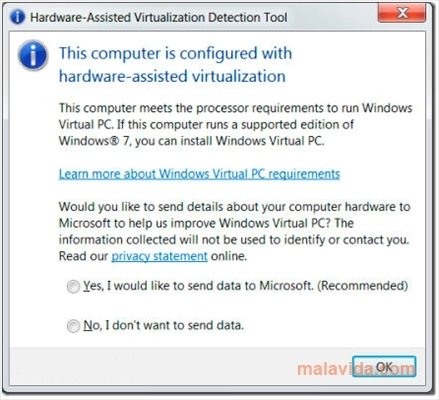
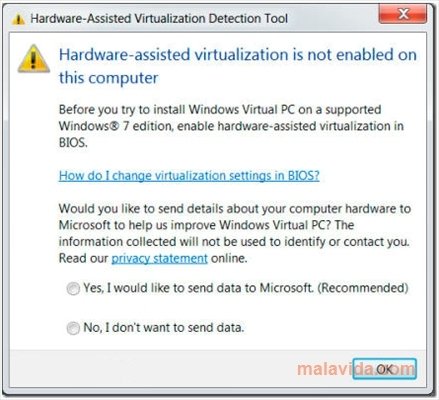
Once launched, the application will return one of the following messages:
- "This computer does not have hardware-assisted virtualization".
- "Hardware-assisted virtualization is not enabled on this computer". In this case you'll have to follow the manufacturer's instructions to activate the option in the BIOS.
- "This computer is configured with hardware-assisted virtualization". Your computer is prepared to install Windows Virtual PC and XP Mode.
Requirements and additional information:
- Compatible with Windows XP SP2 or above.
 Vanessa Martín
¡Hi! I am Vanessa Martin, I like to travel, music, photography, and I am passionate about the Internet, as it is a great source of information where you can find everything you need. If it exists, it is on the Internet. Another of my great...

Antony Peel